Logistics control tower · private build
Catch the delay while there’s still time to fix it.
Portline puts every shipment, container, truck and dock door for ports, 3PLs and shippers on one screen. The reefer drifting warm, the vessel stuck at Busan, the truck that won’t make door 3: you see them in the morning, not in the customer’s email at five.
No sign-in. Runs locally with generated data and makes zero outside requests.
Five jobs
What a control tower team does all day, in one place.
Most ops teams answer “where is it?” by checking a TMS, a WMS, three carrier inboxes and the whiteboard by the dock office. Portline is built around the five jobs that actually fill the shift.
Areas
Only the data you need, in a page or two per area.
Each card lists what its pages show. Your plan decides which areas open; your role decides what you can change.
Overview
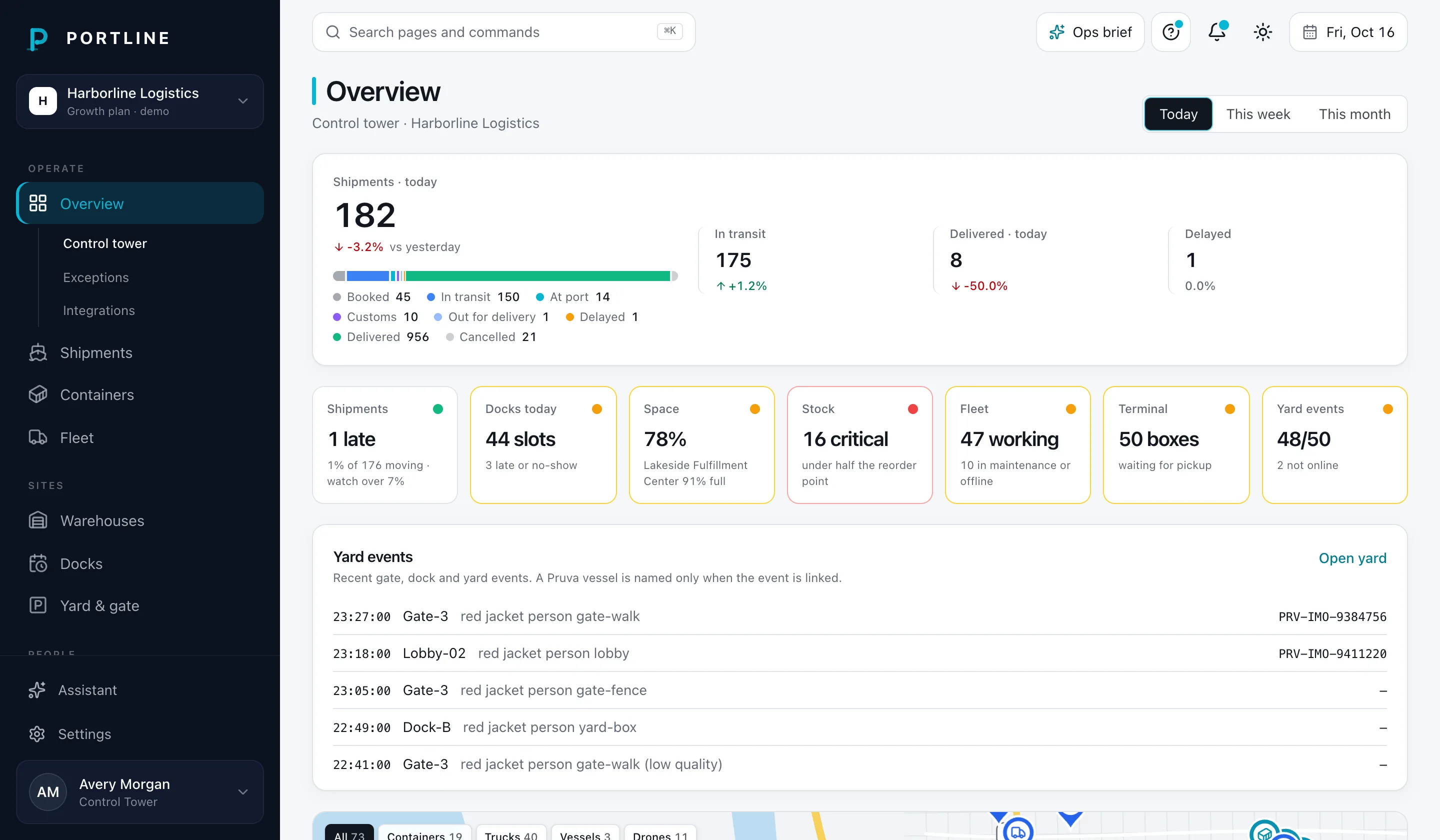
OperateLive map of containers, trucks, vessels and drones, fleet counts, throughput and the shipments that need attention.
- MT
- Sl
- p44
- S
Control towerExceptionsIntegrationsStarter+Shipments
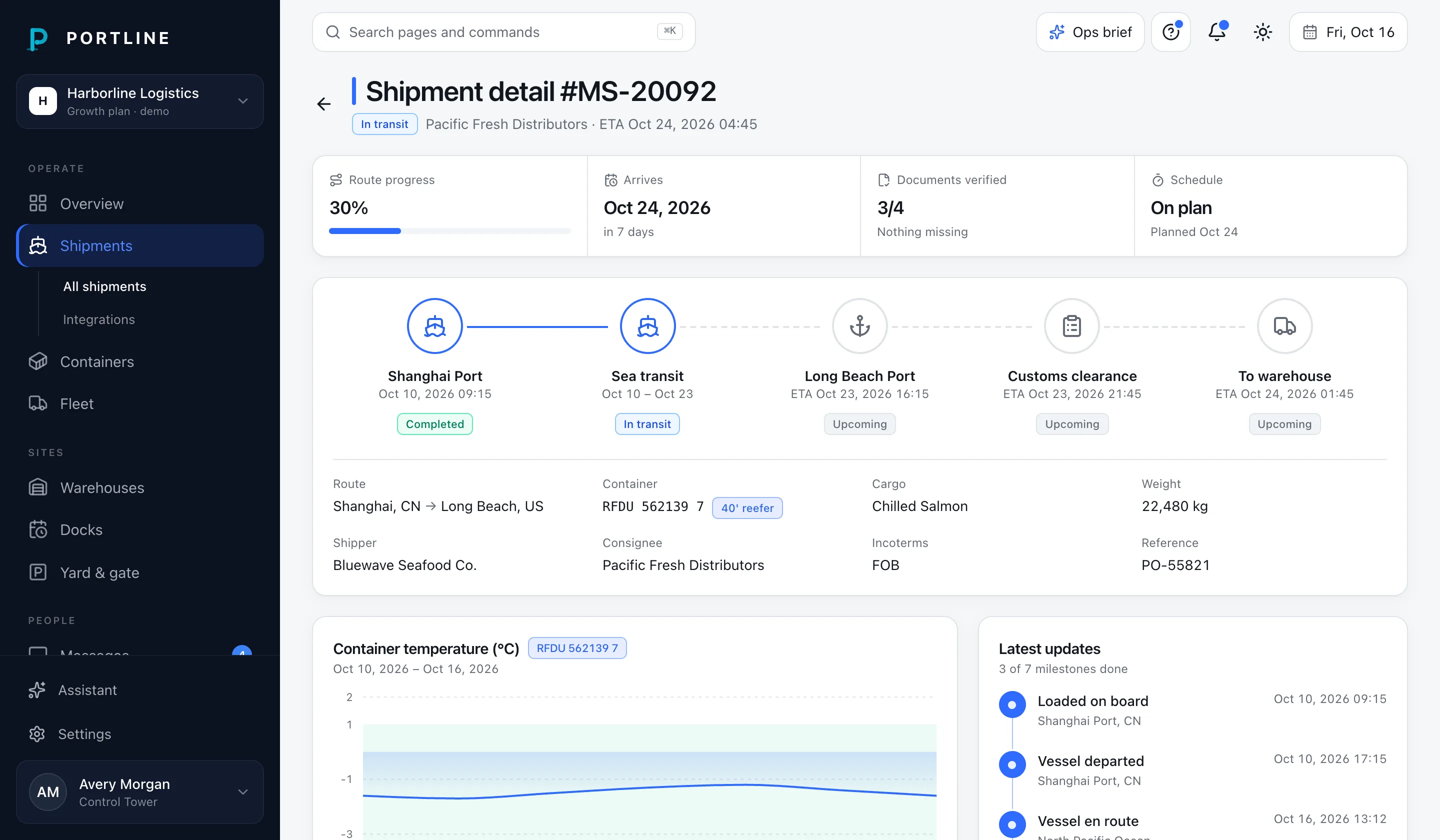
OperateEvery shipment with status, route and weight; a detail page follows one container from port to warehouse.
- p44
- VZ
- OC
All shipmentsIntegrationsStarter+Containers
OperateContainer register with ISO type, location and reefer temperature against set point.
- VZ
- OC
- p44
All containersIntegrationsStarter+Fleet
OperateTrucks, vessels and drones with status and utilisation, plus the driver roster.
- S
- G
- MT
AssetsDriversIntegrationsGrowth+Warehouses
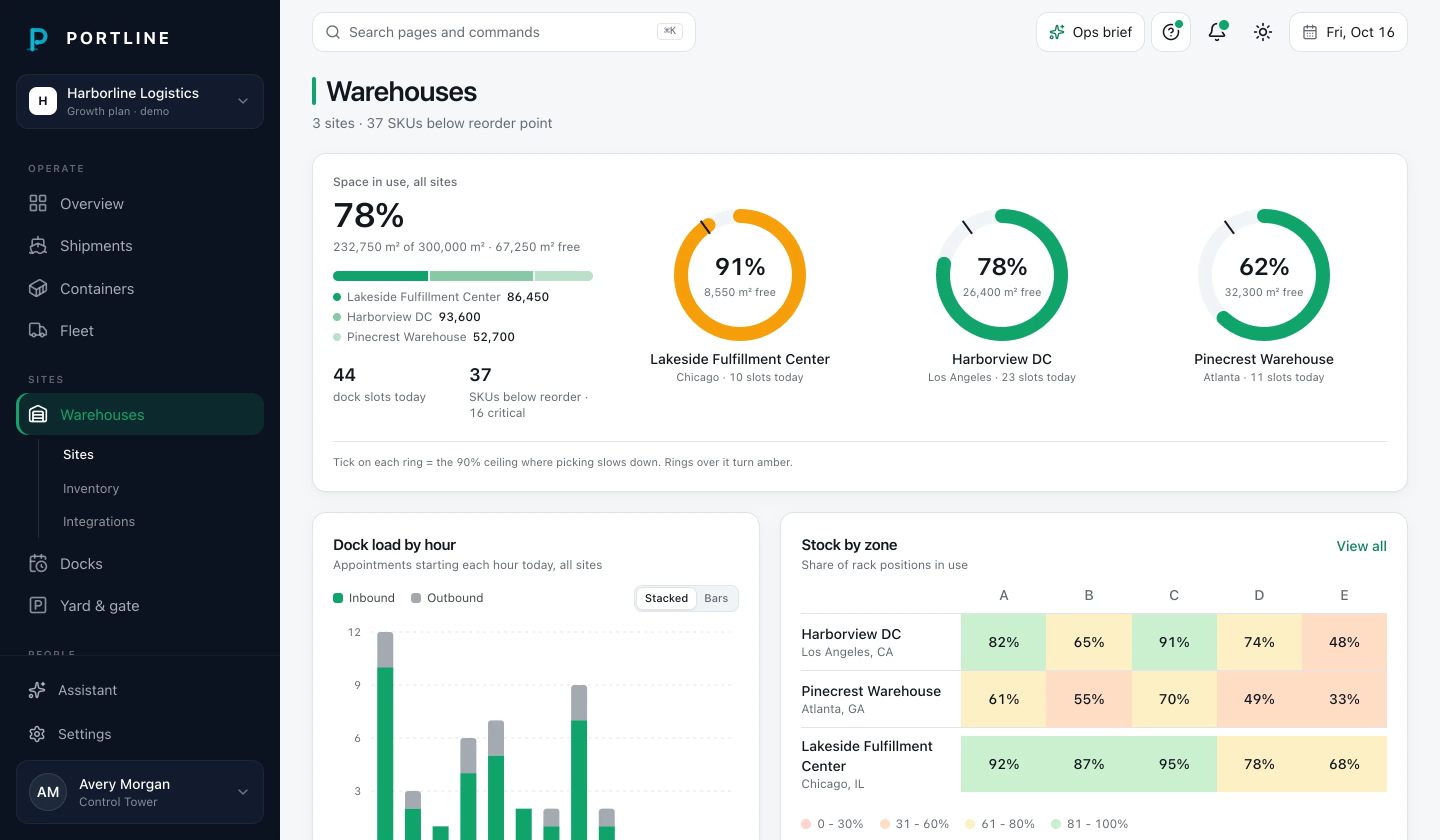
SitesCapacity per site, stock by zone, inbound/outbound docks and low-stock alerts.
- NS
SitesInventoryIntegrationsGrowth+Docks
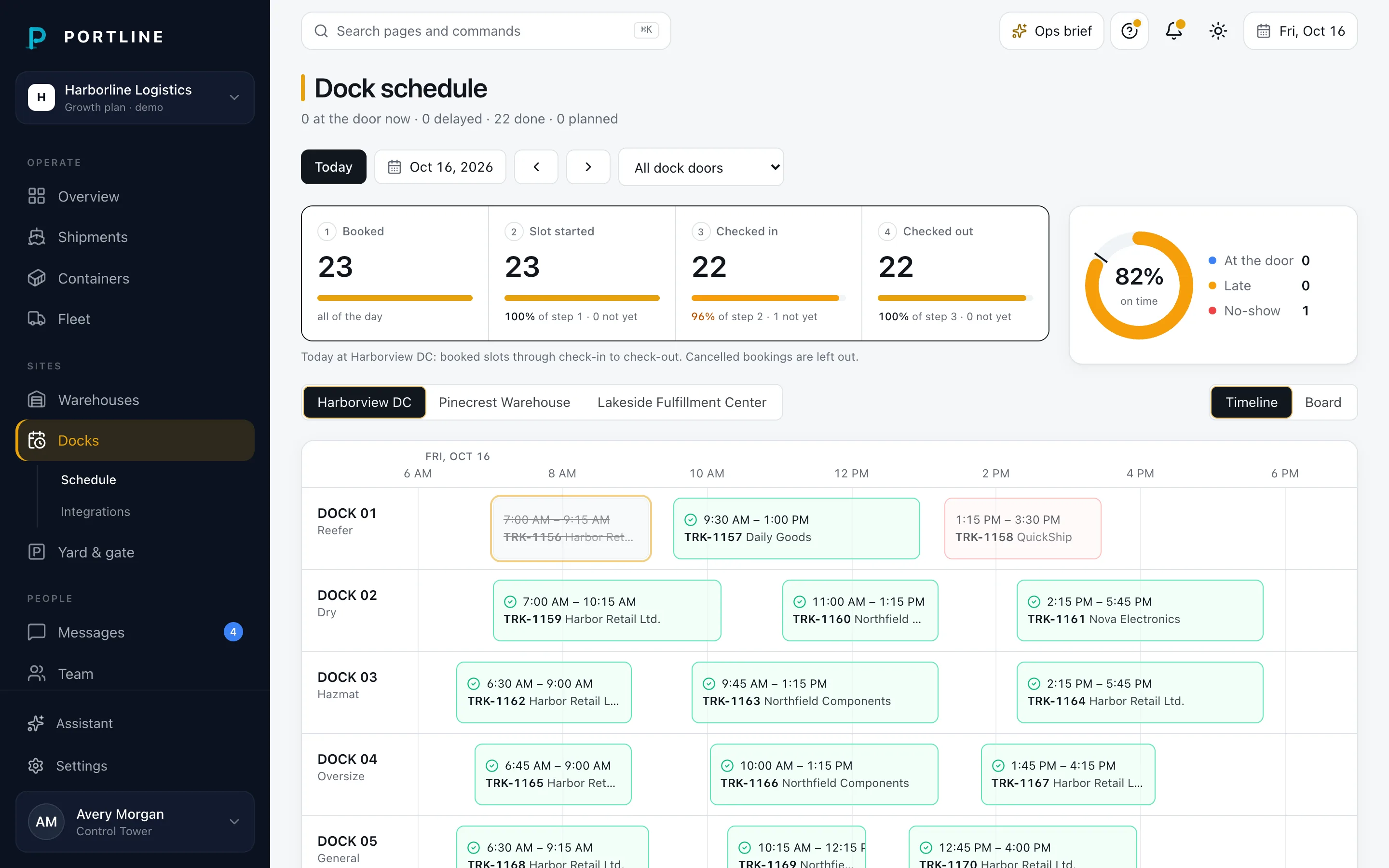
SitesTruck appointments per dock door on a timeline, with driver check-in and check-out.
- S
- Tw
ScheduleIntegrationsGrowth+Yard & gate
SitesYard events with a time, a place, and one line from the clip. A row names a Pruva vessel only when the event is linked to one.
EventsSaved alertsInvestigationExportsGrowth+Messages
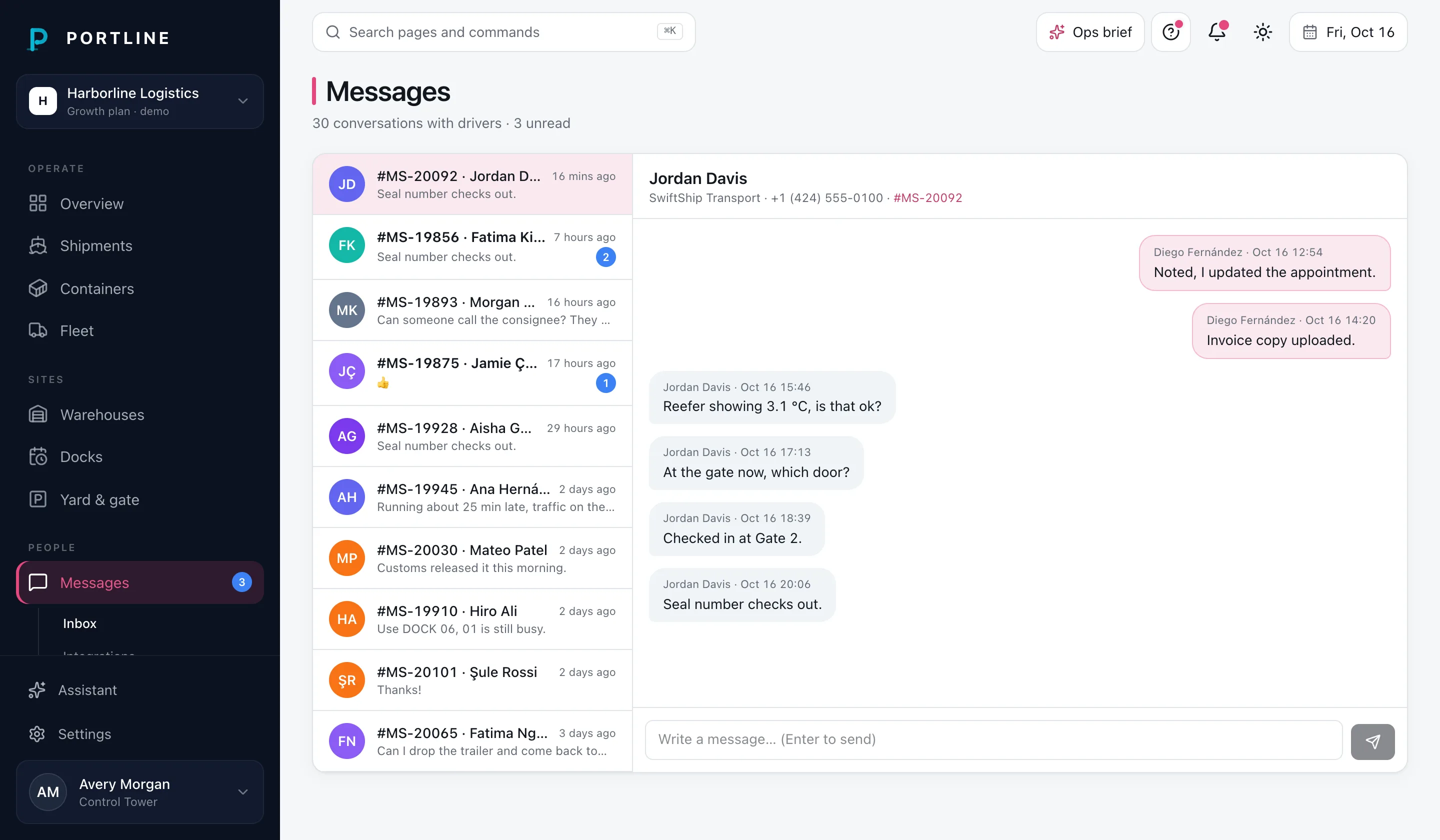
PeopleThreads with drivers and the team, linked to shipments.
- Tw
- Sl
InboxIntegrationsStarter+Team
PeopleWho is in the workspace and what each role can do.
- ME
MembersIntegrationsStarter+
Screens
Screens and recordings from the demo workspace.
![Shipment detail: a five-stage route from Shanghai to Long Beach, reefer temperature against its set point and the latest updates.]()
Shipment detail
Route, reefer temperature, documents, driver
Dock schedule on a tablet
Doors × time, a truck’s details and driver check-in
![Warehouses: capacity rings for three sites, the inbound and outbound dock table and stock by zone.]()
Warehouses
Capacity, stock by zone, low-stock alerts
On a phone
The control tower and the menu at 390 px
![Messages: conversations with drivers, each linked to a shipment.]()
Messages
Driver threads linked to shipments
Demo and local
Same app, two ways to run it.
Demo mode
$ pnpm demo
- App on :4100, this site on :4110, docs on :4120
- No sign-in, a demo banner on every page
- Harborline Logistics: 120 days of history, 14 days ahead
- Changes stay in memory for your browser session; Settings → Demo → Reset
- No outbound requests, and it refuses to start in production
Local mode
$ pnpm db:start
$ pnpm db:seed
$ pnpm local
- Local Supabase: Postgres and Auth, with row-level security on
- Seeded from the same generator as the demo
- Sign in as the owner, an admin, a dispatcher or a viewer
- Every permission is checked by Postgres, not just the UI
- Change the plan with pnpm plan:set as the service role
Pricing
One workspace, priced by what you run.
Starter covers shipments and containers; Growth adds warehouses, docks, fleet and reefer temperature. Add single modules on top, or pick an industry pack.
A 10% deposit opens a 1-month trial, one per customer. The rest of the first year is charged when that month ends. Cancel during the trial and the rest is not charged; the deposit is not refunded. Each price is for one workspace and the sites included in that plan, shown per month and billed annually. After the trial, every plan is a 12-month minimum term, paid up front and not refundable. You can cancel renewal at any time; the plan stays active until the term ends. Terms · Cancellation & refund policy
Tiers
Each tier is a set of areas, seats and sites. Every tier includes the connectors its areas use.
![Portline control tower: a port map with container, truck and vessel pins, fleet counts, a throughput chart and recent shipments.]()
Starter
1-month trial · 10% depositA small forwarder or shipper
One control tower for a small forwarding or shipper team.
$66/mo, billed annually
$79.20 deposit today · $712.80 after the trial month
- Live map and control tower
- Shipments and containers
- Documents checklist
- Messages and team
- 5 seats, 1 site
1,200 AI credits/month per module (≈ 150 summaries on Claude Haiku 5.5), max 20 runs/hour. Runs over the hourly cap queue for the next hour.
Choose Starter16 connectors · mocks in this build
- p44
- VZ
- MT
- S
- Tw
- Sl
- ME
![Warehouses: capacity rings for three sites, the inbound and outbound dock table and stock by zone.]()
Growth
Recommended1-month trial · 10% depositA 3PL on several sites
Warehouses, docks and fleet for a 3PL running several sites.
$154/mo, billed annually
$184.80 deposit today · $1,663.20 after the trial month
Save 30% vs buying the modules separately
- Everything in Starter
- Warehouses and stock by zone
- Dock schedule with driver check-in
- Fleet and drivers
- Reefer temperature
- 20 seats, 5 sites
1,200 AI credits/month per module (≈ 150 summaries on Claude Haiku 5.5), max 30 runs/hour. Runs over the hourly cap queue for the next hour.
Choose Growth23 connectors · mocks in this build
- p44
- VZ
- MT
- S
- G
- OC
- NS
- Tw
- Sl
- ME
![Dock schedule: eight dock doors on a 6 AM to 7 PM timeline with truck appointments and the selected truck.]()
Scale
1-month trial · 10% depositA port or multi-region team
Everything in Growth, plus API access for port and multi-region teams.
$242/mo, billed annually
$290.40 deposit today · $2,613.60 after the trial month
- Everything in Growth
- Custom TOS or gate link, quoted
- 60 seats, 25 sites
1,200 AI credits/month per module (≈ 150 summaries on Claude Haiku 5.5), max 40 runs/hour. Runs over the hourly cap queue for the next hour.
Choose Scale23 connectors · mocks in this build
- p44
- VZ
- MT
- S
- G
- OC
- NS
- Tw
- Sl
- ME
Portline isn’t on sale yet. The store runs in test mode and no card is charged in this local build. The demo runs on Growth.
FAQ
Questions people ask first.
Where does the demo data come from?
It’s generated on your machine when the app starts: a made-up port called Harborline, with 120 days of history and 14 days ahead. Shipments, containers, dock appointments and messages, including the messy parts like a port congestion spike, a reefer with a telemetry gap and a few overdue documents. No real customer data is in it.
Do I need an account to try it?
No. Run pnpm demo and open the app. There’s no sign-in, a banner tells you you’re in the demo, and anything you change lives in memory for your browser session. Settings → Demo → Reset puts it back.
Who can change what?
Four roles. What a role can touch also depends on the plan:
- Owner. Everything, including members and the plan. One per workspace.
- Admin. Everything except the owner. Verifies documents and manages members.
- Dispatcher. Runs daily operations: dock appointments, check-ins, messages, uploads.
- Viewer. Reads everything the plan includes. Changes nothing.
In local mode Postgres row-level security enforces the same rules, so a viewer can’t write even if they skip the app and call the database directly.
Does it connect to my carriers, telematics or TMS?
Not yet. Every connector (carrier visibility, vessel positions, telematics, reefer sensors, ERP, scanners, messaging, sign-in) is a mock in this build, and the demo makes no outbound requests. Each area has an Integrations page, and Settings → Connections lists them all. Picking real vendors comes before launch.
Is the data secure?
Each workspace only sees its own rows, and plan, status and seat changes can only be made by the service role, never from the app. The docs list all eleven rules the database enforces, each with a test that tries to break it.
How does the free trial work?
A 10% deposit opens a 1-month trial, one per customer. At checkout you add a payment method, agree to the terms, and pay that deposit. The rest of the first year is charged when the month ends, and the 12-month term starts then. Cancel during the trial and the rest is not charged. The deposit is not refunded. You keep access until the trial ends, then the plan stops. During the trial AI is limited to 400 AI credits in total.
How is Portline billed?
Annually, in advance, from the day the trial ends. Prices are shown per month, so Starter is $66/mo, billed annually, but the whole year is charged at once. There is no month-to-month option. After the trial, every tier, pack and add-on is a 12-month minimum term. See the Terms and the Cancellation & refund policy.
Can I get a refund?
Not once the trial has ended and the first year is charged. From then on payments aren’t refunded or credited, including if you cancel early or stop using Portline. Cancelling renewal stops the next annual charge. Your plan stays active until the end of the current term. Nothing already paid is refunded. To pay nothing at all, cancel during the trial.
How do I cancel?
The workspace owner cancels in Settings → Plan & billing. During the trial that’s Cancel trial: Cancelling the trial stops the rest of the charge. The 10% deposit is not refunded. You keep access until the trial month ends, then the plan stops. After the trial it’s Cancel renewal, which stops the next annual charge; the plan stays active until the term ends.
What happens when the term ends?
If renewal is on, the plan renews for another 12 months and the next year is charged on the renewal date. If you cancelled renewal, the plan ends on that date and the workspace becomes read-only.
Can I change plan in the middle of a term?
Yes. A change starts a new 12-month term from the day you make it, billed for the new plan. In this build the old term isn’t prorated or refunded.
Should I pick a tier or an industry pack?
A tier is a general set of areas: Starter, Growth, Scale. A pack is four or five modules picked for one industry (Cold chain, Drayage & trucking, 3PL warehousing) and costs less than Starter plus the same add-ons. If one pack covers what you run, it’s usually the cheaper choice. Either way you can add single modules on top.
What do yard events show?
Each row is a time, a place, and one line from a clip already in the workspace. When that event is linked to a shipment, the row names the Pruva vessel. Noon reports, crew, and insurance stay in Pruva. In this build the clips are generated. No model is called, and the page makes no request to Pruva.
How do AI credits work?
Every AI run costs credits, and the number depends on the model: one credit is $0.001 of model cost. Each AI step (a summary, a damage check on a photo, a voice note) has a default model, and you can pick another model of the same kind for a run. Tiers give each included module its own monthly credits; Growth has 1,200 per module. Packs share one pool across their modules. There’s also an hourly cap on runs: a run over the cap waits in a queue and runs in the background in the next hour. A run that would go past your credits is refused until the next month. A free trial gets 400 credits in total. Model prices are estimates until they’ve been checked against each provider.
Open Harborline’s control tower and break something.
Move a dock appointment, check a driver out, upload a document. Reset when you’re done.